 TALOS
Install and update
Homebrew on macOS
brew install AVP-Dev/apps/talos
brew update && brew upgrade AVP-Dev/apps/talos
Run the first command to install and the second when the tap publishes an update. If your shell picks an older copy, use type -a talos and talos doctor to check the executable search order and active binary.
Release archives
Download an archive for your platform and the matching .sha256 file from GitHub Releases. For example, with the Ubuntu-compatible x86-64 archive for v0.1.1 in your current directory:
archive=talos-v0.1.1-x86_64-unknown-linux-gnu.tar.gz
shasum -a 256 -c "$archive.sha256" &&
  tar -xzf "$archive" &&
  install -d "$HOME/.local/bin" &&
  install -m 0755 "${archive%.tar.gz}/talos" "$HOME/.local/bin/talos"
"$HOME/.local/bin/talos" --version
On Linux, sha256sum -c "$archive.sha256" also verifies the file. For macOS or Linux ARM64, use the corresponding asset name shown on the release page. Ensure $HOME/.local/bin is on your shell’s PATH.
Installer script or source
For an install script you can inspect before running:
curl -fsSLo talos-install.sh https://raw.githubusercontent.com/AVP-Dev/talos/v0.1.1/install.sh
less talos-install.sh
bash talos-install.sh
The installer verifies the downloaded archive’s checksum and defaults to $HOME/.local/bin/talos. From a TALOS source checkout, cargo install --locked --path . builds with Rust 1.100 or newer.
Start a task in the cockpit
Use an existing Git repository with a first commit. Install and configure at least one coding CLI separately. In your project, run talos or talos tui. If you launch from outside a Git project, the cockpit asks for a project path.
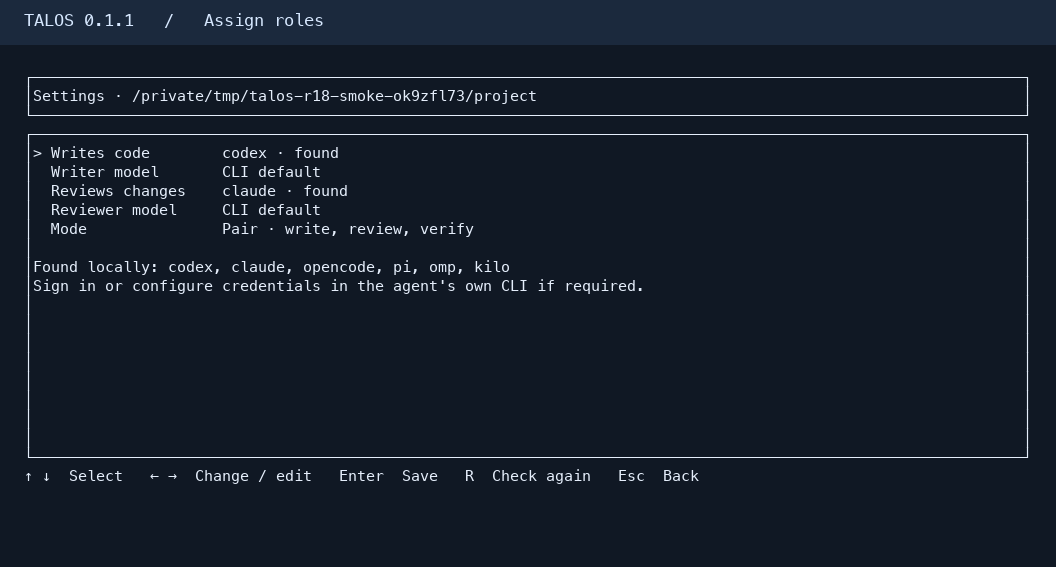
- Settings. Open
/configor press F2. Use arrows to select and change the Writer, Critic, model or mode. Save with Enter. R rechecks local CLI availability after installation. Authenticate in the selected CLI itself when required. - Draft. Enter a task with an observable outcome. Enter opens the review screen. It shows the assigned roles, selected models, mode and configured check commands. Esc returns to editing.
- Run. On the review screen, Enter queues and starts that task. A blocked draft remains available. For uncommitted changes, use D to inspect the diff and F5 to return after reviewing your Git changes.
- Result. See the task status, saved report and run details. D on a completed result opens its saved Git diff when available.
/historyor F3 opens the task list. Open a queued task to retry or cancel it. - New session. Use
/newor F4 while idle. It clears the working view and the next run starts fresh agent conversations. Project settings and earlier results remain available.
Input editing — use arrow keys, repeated Backspace, multiline paste, Ctrl+W or Alt+Backspace to delete a word, and Esc to clear the input. In the cockpit, /pause, /resume, /stop, /help and /exit are also available.
Configure project checks
Set checks before you confirm a task so the review screen can show the commands. From a normal shell, for a Rust project:
talos config set checks '[{"id":"test","argv":["cargo","test"],"version_argv":["cargo","--version"],"working_directory":"."}]'
talos config show
The check list is project-specific and replaces the current list. Use commands relevant to the target repository, such as pytest for Python or npm test for Node.js. TALOS accepts allowlisted argv arrays and records results against the approved Git revision. If the review screen says no project checks are configured, the run has no configured project test commands.
Run from a shell
talos doctor
talos config set writer codex
talos config set critic claude
talos config set mode pair
talos task add "Add a test for empty parser input" --criteria "The test covers empty input and the existing suite passes."
talos task list
talos up --auto --task 1
talos task evidence 1
Replace 1 with the actual task ID. Use talos up --auto to process the runnable queue, or add --mode team to select Team for that run. talos config set max-writers 2 changes the project’s Writer limit. Use talos status, talos task show <ID>, and talos logs <ID> to inspect work.
Recover and troubleshoot
| What you see | What to do |
|---|---|
| CLI unavailable | Install or configure a CLI, open Settings, and press R. Choose a discovered CLI for the affected role. Use talos doctor for adapter details. |
| Authentication required | Sign in through the provider’s CLI, then retry the eligible stage or edit the failed task as a new draft. Check the cockpit’s run details for the failing role. |
| Git changes block a new task | Inspect the paths with D or git status --short. Commit or stash your own work intentionally, then return to the draft. An earlier TALOS version may have left a .gitignore change or a root-level report that needs review. |
| A check failed | Inspect talos task evidence <ID> and the task details. The verification result is recorded separately from the Critic decision. |
| Queue paused | Use /resume in the cockpit or talos resume in a shell. After manual changes, inspect and reconcile Git state with talos resume --reconcile when needed. |
| Writer stopped or interrupted | Use /stop or talos stop to request a Writer stop. After an unexpected shutdown, use talos task recover to quarantine ambiguous attempts. Inspect the project and use talos task resolve --help for explicit operator decisions. |
For a persistent control shell, use talos attach with tmux installed. Bare talos opens the cockpit directly. Reopening the cockpit reads durable state. When a process disappears or its outcome is uncertain, use recovery to reconcile it.
The project owns .talos/config.json, .talos/state.sqlite3, and per-task logs and reports. A successful automatic run can save verified changes in a local Git commit. GitHub publication requires project policy and the applicable confirmation path. Inspect local changes and reports before sharing them.
Maintainer release procedure
Use a stable tag matching the Cargo package version. The release workflow builds four platform archives, smoke-tests each binary, and generates talos.rb from the checksums of the release assets. It uses the versioned release notes when present. Apply the generated formula to the Homebrew tap to make the release installable through Homebrew.
For a tap PR, configure TALOS_HOMEBREW_TAP_TOKEN with contents and pull request write access limited to the tap. Enable propose_tap_update through manual workflow dispatch for one tag, or set TALOS_AUTO_PROPOSE_TAP to true for future releases. The tap serves the new version after the PR is merged.